
Data Wednesday: Embedding Search Results
By
Becky Sweger
Posted:
|
Transparency & Data
This is the latest entry in NPP’s weekly Data Wednesday series, a getting-started guide to NPP’s Federal Priorities Database. All previous posts are archived here.
A post from a few weeks ago showed one way to share the results of a database search. In that example, you grab a hyperlink that goes right to the Federal Tax Collections data, which can then be shared via e-mail and social media.
If you have your own website, another way to share information from the Federal Priorities Database is to embed the interactive map right into a web page. After you run a search, click the Embed Map button on the right-hand side of the screen. A box that contains the “embed code” now appears and looks something like this:
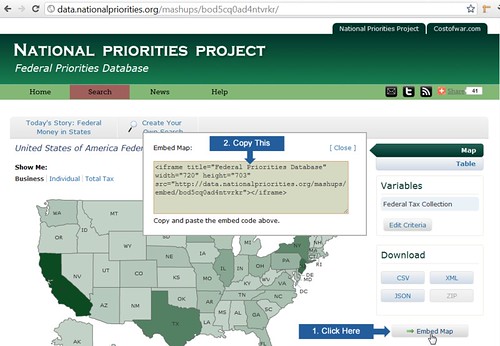
Just copy this code and use your favorite HTML editor to paste it into your web page. After you save the page and load it, you’ll see a smaller version of the familiar search results map. Most of its interactive features will work right from your site (for example, the year slider, county-level data, and adjusting for inflation). There will also be a link back to the Federal Priorities database, so you and your site visitors can read the notes and sources, use the table view, and download the data.